Adding a Listing to Your Favourites
How do you add your listings to your favourites on Troc-Vélo?
You have done a search and have several listings that could match what you are looking for? Or do you simply want to set aside listings that interest you so you can contact the sellers later?

You can now add them to your favourites on your Troc-Vélo account so you can find them easily and, above all, be notified if the price drops or if the listing is finally sold
To do so, simply click the heart at the top right of the photos, whether you are on the product page or on the results page.
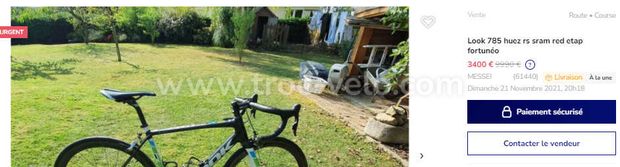
How do I find the listings I have added to my favourites?
To find all your saved listings, just go to the my favourites page, accessible at the top right and marked by a heart.

What are the frequently asked questions?
Find us on the Google Play Store and the Apple Store

|

|