Frequently Asked Questions – all the answers in the Troc Vélo FAQ
My Account (creation, management, deletion) ✏️
How do I personalise my newsletter?
To receive personalised newsletters, fill in your interests on Troc-Vélo: go to the My details section from your account. At the very bottom, you can choose one or more interests from the following: road bike, MTB, gravel, leisure/urban, triathlon.
How do I change my email?
To change the email address linked to your Troc Vélo account, go to the "My information" page, after clicking "My account".
My account is blocked: why? What should I do?
You try to log in and a message tells you that your account has been blocked by the Troc-Vélo Team. What should you do?
Why can an account be blocked? The safety of our users is our priority, so we carry out both automatic and manual moderation of the platform. We reserve the right to block accounts that show suspicious elements, have been reported or have breached the platform's terms of use.
How can I find out why I was blocked? To keep the platform as secure as possible, we cannot share details about our moderation rules. That is why we do not give any further information when a blocked account logs in.
How do I unblock my account? If you think you were blocked wrongly by an overzealous rule or moderator, our team is available by email to help you via the contact form. Once you have submitted the contact form, a moderator will be able to unblock you and you will regain full access to your account's features.
I receive too many emails, what can I do?
You may receive several types of emails: some are necessary for the platform to work properly, but others are optional and can be limited.
-
Newsletter: You can unsubscribe from the Newsletter at any time by clicking the unsubscribe link at the bottom of the newsletters.
-
New listings: If you have saved a search without turning off email notifications, you will receive an email for every new listing matching your search. No longer want to be alerted? You can delete or edit this search from the "My searches" page.
-
Favourites: When you add a listing to your favourites, you receive automatic emails when the price changes or when the listing is sold or deleted. To stop receiving this type of email and remove the listings you have added to your favourites, go to the "My favourites" page.
-
Emails required for the platform to work: The other emails are necessary for the platform to work properly. They let you know when a buyer wants to contact you, when your listings are no longer visible or have expired, and help manage the security and integrity of your account. They cannot be turned off.
How do I save a search to be notified of relevant new listings?
Start your search and use the relevant filters to help you find the product you are looking for (brand, condition or any other available filter). Once on the search results page, if no product suits you and you want to quickly run your search again or be alerted by email when new listings are posted matching these criteria, simply save your search. On mobile, the "Save my search" button appears at the bottom of the screen as you scroll down the results page. On a computer, it is displayed on the left, at the top of the filter area.
When saving, you can choose whether or not to receive email alerts, as well as how often, for each relevant new listing that is posted. By default, email alerts are turned on. At any time, edit or delete your saved searches from the "My searches" page or by clicking this link.
How do I add a listing to my favourites?
To quickly find a listing again, you can add it to your favourites by clicking the heart icon on the listing. You can quickly access all your favourite listings via the My favourites button after clicking "My account". When you add a listing to your favourites, you receive alerts by email and via the platform's messages when:
- the listing's price drops
- the listing is sold
How do I permanently delete my Troc-Vélo account?
To delete your account, please contact us using the contact form, clearly stating that you wish to delete your Troc-Vélo account.
What should I do if I can't remember my password?
If you have forgotten your password, simply click "Forgot password" on the login page. You will then receive an email at the address linked to your Troc-Vélo account inviting you to reset your password. Remember to check your spam and junk folders if you do not receive the email within a few minutes. If you have any other difficulties, contact our support team directly.
What should I do if I can no longer log in to my account?
If you have forgotten your password, simply click "Forgot password" on the login page.
Otherwise, your account may have been blocked by a Troc-Vélo administrator, in which case please contact us directly at contact@troc-velo.com to discuss your situation with the Troc Vélo team.
How do I change my personal details?
You can edit and manage your personal details from the My details page. Once you have made your changes, remember to save them by clicking the button provided at the bottom of the page. To keep the platform secure, your username can only be changed on request by contacting us at contact@troc-velo.com.
How do I change my username?
If you would like to change your username, for security reasons we ask that you write to us from the email address linked to your Troc Vélo account. Contact us at contact@troc-velo.com, stating your current username and the new username you would like to use on your account. Beforehand, please check using the site's search bar that no other user already has the same username. We will then change your username.
How do I create a Troc-Vélo account?
To create your Troc-Vélo account, follow this link. It's quick and easy!
A quick tip:
- We recommend that you do not use your first and last name in your username or email address.
- Choose a strong password that meets the requirements shown.
Once your account is created, you will receive an email containing a four-digit code to confirm your registration. Please enter it in the corresponding field to access all the platform's features.
Once your email is verified, your account is ready to use: welcome to the community of Trockers!
How do I unsubscribe from the newsletter?
To unsubscribe from the newsletter, click the "Unsubscribe" link at the bottom of each of our newsletters.
How do I transfer money from my wallet to my bank account?
The money you receive from your sales on Troc Vélo is recorded on your "My wallet" page. To make your first transfer, you must have verified your identity and added your bank details (IBAN).
You can transfer your balance to your bank account at any time (free of charge):
- Log in to your Troc Vélo account.
- From the "My wallet" page
- Click the “Transfer to my bank account” button. A message tells you that you are about to transfer your balance to your bank account.
- Check that the bank details shown are correct and click “Confirm transfer”. Your transfer is then confirmed! Allow a few days for the money to become available in your bank account (depending on your bank's processing times).
When will I receive the money in my bank account?
Once you have requested the transfer of funds from your Troc Vélo wallet to your bank account, it takes effect on your account within 3 to 4 working days. This time may vary depending on the bank.
Where can I find the history of my option and credit purchases?
On the "My transactions and invoices" page, you can see the history of your latest purchases of boost options or credits. The related invoices are also available there.
Where can I find the history of my past sales?
From the "My transactions and invoices" page, you can see the history of your past sales. The related invoices are also available there.
Where can I find the history of my fund transfers?
On the "My wallet" page, you will find a summary of your latest requests for transfers to your bank account, as well as your requests to convert your balance into Alltricks gift vouchers (with a 5% top-up).
How do I verify my identity?
As a private seller:
- Log in to your Troc Vélo account;
- Click "My account" then "My wallet";
- Complete the two-step form:
- Provide your ID document (passport, national ID card, driving licence);
- Your bank details (IBAN)
Once your form has been submitted, it will be reviewed by our payment partner as soon as possible. Once your ID document and bank details have been verified, you will be able to transfer the available funds from your wallet to your bank account.
As a business:
- Log in to your Troc Vélo account;
- Click "My account" then "My wallet";
- Complete the two-step form:
- Complete your legal documents;
- Complete your bank details
Note: Once your form has been submitted, it will be reviewed by our payment partner as soon as possible. Once your ID document and bank details have been verified, you will be able to transfer the available funds from your wallet to your bank account.
What are credits used for?
Credits are the in-app currency on Troc-Vélo. They let you boost your listings quickly in just a few clicks, without having to enter your bank details every time you post or boost a listing. You can buy credits on this page: Buy credits Please note: credits on Troc Vélo are not intended for buying products from other users. As a private seller, credits can only be used to boost the visibility of your listings.
How do I switch from a private account to a business account?
An account's status is final and cannot be changed. If you want to change status, you need to create a new account with business status from the following page: Business account creation
I am not receiving emails from Troc Vélo. What should I do?
- Check your spam folder
First, remember to check your junk mail
- Contact customer service
After checking your inbox, contact Troc Vélo customer service at contact@troc-velo.com
I cannot verify my email and/or my device. What should I do?
To verify your email: once you have registered, you will receive an email at the address you entered when creating your account. Click the link in that email and your address will be verified. Remember to check your junk mail. To verify your device when logging in from a new device, it is very simple: you will be sent an email containing a 4-digit code, which you need to enter in the field shown on your screen.
If you have any difficulty verifying your device or your email, please contact us at the following address: contact@troc-velo.com
How do I edit and delete my saved searches?
You can edit and delete your saved searches from the "My searches" page. From this page you can also change how often you want to receive information emails when a new listing matching your criteria is posted.
My Business account 👷♂️
I am a business and I would like to use Troc Vélo. How do I go about it?
As a business, you can of course create an account on Troc-Vélo. To do so, you need to register as a business and fill in the registration form. Once your account is created, you have access to all the platform's features. If you have any special requirements or further questions, please do not hesitate to contact our customer support team, who are available throughout the week.
I want to boost a listing, can I use my credits?
You can use your credits to boost your listings. Once you have selected the boost option, you can choose between paying by bank card or PayPal or using your credits. If you do not have enough credits in your account, you can pay part of the amount with your remaining credits and the rest by bank card or PayPal.
Why create a business account?
Troc Vélo is the largest community of cycling and outdoor enthusiasts in France. Having your shop on Troc-Velo.com means benefiting from the strength of our brand and our search ranking to accelerate your business. You set your own prices and can choose to sell your listings without secure payment, in which case posting a listing is paid, or with secure payment, in which case a seller fee applies on each sale (see Terms of Sale: Article 11.7).
- A business account gives you more visibility thanks to a dedicated filter.
- The PRO badge on your products builds buyers' trust.
To find out more, feel free to get in touch with our team via our contact form or at contact@troc-velo.com.
How much does a business account cost?
Creating a business account is completely free on Troc Vélo.
Once your account is created, we offer two distinct models for putting your listings online:
-
You can choose to sell your listings without secure payment. In this case, posting a listing is paid, but there is no seller fee on sales. Posting a listing costs €3 for 30 days of publication. This is the average duration chosen by our business sellers.
-
Or, you can publish your listings with secure payment. In this case, posting a listing is free, but a seller fee applies on each sale (see Terms of Sale: Article 11.7).
What are credits used for?
Credits are the in-app currency on Troc-Vélo. They let you boost your listings quickly in just a few clicks, without having to enter your bank details every time you post or boost a listing. You can buy credits on this page: Buy credits
Where can I find my invoices for credit or boost option purchases?
Find your invoices for credit and option purchases on your 'My transactions and invoices' page
Can a private account be switched to a business account and vice versa?
It is not possible to switch a business account to a private account or vice versa. If your status changes, we invite you to create a new account here.
Does verifying my legal documents take long?
The legal documents relating to the identity of your company or association are handled by a payment service provider called Stripe. This verification is carried out within 24 to 48 hours (working days). Thank you for your understanding.
For the collection and verification of this information, Troc Vélo acts exclusively as a technical service provider, giving users the ability to fill in, edit and/or update the information they provide to Stripe via the Troc Vélo website.
The information checks carried out by Stripe are separate from and independent of any checks Troc Vélo may carry out in connection with your use of the Troc Vélo platform for its services, in accordance with the Troc Vélo Terms of Sale.
Which documents do I need to register on the platform as a business?
To verify your identity as a business and allow you to receive the money from your sales, the following documents and information are requested:
- An up-to-date Kbis extract (company registration certificate);
- Your articles of association, dated and signed less than 3 months ago;
- A valid ID document of the company's legal representative;
- Information about the company's legal representative(s);
- Information about each shareholder holding at least 25% of the capital (UBO declaration).
Note: Once this information and these documents have been submitted, they will be reviewed by our payment partner as soon as possible. Once everything has been verified, you will be able to transfer the available funds from your Troc Vélo wallet to your bank account.
Go to the "My wallet" page to add your legal documents.
How do I connect my shop via API to publish my product catalogue quickly?
To do so, please contact us directly via our contact form or at contact@troc-Velo.com.
How do I become an advertiser on Troc Vélo?
To advertise on Troc Vélo and be visible in our advertising spaces, please read the following article:
Advertise on Troc Vélo: available advertising spaces
We also offer the following advertising spaces:
- Home page banner
- Category banner
- Brand page banner
How do I put my shop in the home page banner?
To feature your shop on the Troc Vélo home page, simply contact support by email at contact@troc-velo.com or via our contact form.
How do I boost my listings?
On the "My listings" page, click the "Sell faster" button at the bottom of the listing you want to boost, then choose your option.
How do I add a video to my listings?
You can now add videos to your listings to show your product from every angle and build trust among members of the platform. To find out how, read the following article: Sell better online: add a video to your Troc Vélo listings
Monthly top-up for your credit purchases
We do offer a subscription for buying credits via a SEPA mandate. However, this offer is exclusively reserved for businesses wanting to subscribe for more than €250 per month. For more information, or if you are interested, feel free to contact support via the contact form.
Sell on Troc Vélo with secure payment 🔒
Why sell with secure payment?
Secure payment is a service offered by most platforms for sales between private individuals. It is a paid service whose purpose, on the seller's side, is to guarantee the buyer's solvency. If you use secure payment, the transaction amount is secured in a third-party account before you ship the parcel. You will only be able to collect it once the buyer has received the product, but the funds are secured as soon as you accept a buyer's offer.
All sellers can use secure payment, whether they are private sellers or businesses.
Can I post a listing for free?
Yes, as a private seller, posting a listing is completely free.
Which carrier should I use to send a bulky parcel?
To send a complete bike, we do not have an integrated solution yet, but we are working on it. In the meantime, we recommend the collaborative solution Cocolis, which offers good value for money, quality and security. For more information on how Cocolis works, click here. We have also had good feedback about the carriers Colisport and Transpo'Vélo, but to date we have not had any feedback from users who have used their services.
You can also use standard carriers. Here is a list of carriers for sending your bulky parcels:
- La Poste, for an extra fee
- Fedex
- UPS
- France Express
- DPD
- GLS
- Geodis
To pack your bike, you can get boxes from bike shops, or our partner Alltricks offers a 100% cardboard shipping KIT that suits most bikes.
How do I pack a complete bike properly?
To ship your bike, you need to pack it properly. We have prepared a complete guide on this subject here.
You can use recycled cardboard, or we offer a packing KIT on the Alltricks website: Plastic-free KIT
We work to limit the carbon impact of our packaging:
- the KIT arrives on its own, with no outer packaging (do not cut it open with a box cutter)
- the KIT is compact (160x30x85) : there is no superfluous cardboard
- the KIT is plastic-free: even the tape supplied is 100% recyclable
- the KIT is affordable.
Find the step-by-step instructions here.
What is Troc Vélo secure payment?
Troc Vélo secure payment keeps the amount of a sale safe with a Troc Vélo banking partner while the buyer and the seller complete their transaction.
- For the seller, it guarantees that the buyer is solvent.
- For the buyer, it guarantees they will receive the product and check that it is as described before the seller is paid.
How much does secure payment cost?
As a private seller, the Troc Vélo secure payment service is free. You do not have to pay any fees upfront, as they are covered by the buyer.
How do I get my money after a sale?
To withdraw the proceeds of your sales, please read the following article: read the article
Please note: for regulatory reasons, the funds in your Troc Vélo wallet are blocked for 3 to 4 days once the buyer has confirmed receipt of the parcel and that the product is as described. Once this period has passed, you will be able to transfer them to your bank account.
Which delivery methods are available?
Currently, Troc Vélo secure payment is available with 'In-person handover' and 'Delivery by the seller' (custom delivery). In a few weeks, new integrated delivery methods and payment methods will be offered, notably integrated delivery with Mondial Relay for sending small and medium-sized parcels, as well as payment in instalments or by PayPal.
How does a transaction with delivery by the seller work?
- The buyer wants to make an offer on a product: after clicking the "Buy now" button on the product page, they select "Delivery by the seller". The shipping costs entered by the seller are then automatically added to the basket.
- They enter their bank details to reserve the item and a hold is placed on their account ;
- The seller accepts the offer: the amount is debited from the buyer's bank account and held securely with our banking partner ; ⚠️ If the buyer's offer is neither accepted nor declined within 72 hours, the transaction is automatically cancelled and the hold on the buyer's account is released.
- Once the offer is accepted, the seller has 14 calendar days to upload the packing proof in the messages and ship the parcel. The seller must also remember to enter the parcel tracking number in the field provided, in the conversation with the buyer. ⚠️ If the seller has not dropped off the parcel within the 14-day period, the transaction is automatically cancelled and the funds are returned to the buyer's bank account.
- The buyer receives the parcel, checks that the product is as described in the listing and validates the transaction on Troc Vélo in their conversation with the seller. ⚠️ The buyer can open a dispute within 72 hours after the transaction has moved to "Delivered" status.
- If the buyer confirms that the product is as described, or takes no action within 72 hours of the item moving to "Delivered" status, the money is sent to the seller's Troc Vélo wallet. ⚠️ There is no going back at this stage. This transfer is final.
The seller can transfer their funds to their bank account, provided their identity has been verified.
How does an in-person handover with Troc Vélo work?
Here are the steps of a purchase or sale using Troc Vélo secure payment with in-person handover:
- The buyer makes an offer on a product and chooses the 'In-person handover' transaction method;
- They enter their bank details to reserve the item and a hold is then placed on their account ;
- The seller accepts the offer. At that point, the amount is debited from the buyer's bank account and held securely with our banking partner ; ⚠️ If the buyer's offer is neither accepted nor declined within 72 hours, the transaction is automatically cancelled and the hold on the buyer's account is released.
- The buyer and the seller exchange the item after agreeing on a meeting within 30 days. ⚠️ At the end of this period, the transaction is automatically cancelled and the funds are returned to the buyer's bank account .
- At the handover, the buyer checks that the product is as described in the listing.
- If so, the seller shares the validation code available in their conversation with the buyer in their Troc Vélo messages.
- The buyer must enter this code in the same conversation to validate the transaction.
- When the buyer enters the code, the money is released to the seller's wallet. ⚠️ There is no going back: this transfer is final.
The seller can transfer their funds to their bank account.
Where can I find my transaction number?
The transaction number is visible from your Troc Vélo account:
- Log in to your Troc Vélo account
- Click "My account" then "My transactions and invoices".
- You will then see the list of your transactions.
Where can I find a summary of my sales and purchases?
To find information about your latest sales:
- Log in to your Troc Vélo account.
- Go to "My account" then "My transactions and invoices".
- Then select the "Sales" or "Purchases" tab.
You will then see the list of your transactions made through the secure payment service (custom delivery or in-person handover). There you can find, among other things, the transaction number for each sale and your Troc Vélo invoices.
Where can I find the invoices for my transactions?
You can get a Troc Vélo invoice for your purchases of options and credits and for any seller fees that may apply.
To find all your Troc Vélo invoices, go to the "My transactions and invoices" page.
- Invoices for credit or option purchases are in the "Purchases" tab;
- And invoices for a sale made through secure payment are in the "Sales" tab
Can a sale be made before I add my bank details?
Yes, you can make sales on Troc Vélo without having added your bank details. However, to withdraw the funds available in your Troc Vélo wallet, you will need to verify your identity with our banking partner and add bank details in your name (the account must be in the name of the Troc Vélo account holder).
Why do I have to verify my identity?
Verifying your identity is a prerequisite for withdrawing the proceeds of your sales. It is a legal obligation intended to limit fraud and money laundering. The information requested differs depending on whether you are a private seller or a business.
Which documents are needed to verify my identity?
As a private seller, to verify your identity you need a valid ID document from the following:
- driving licence
- national ID card
- passport
How do I decline a purchase offer?
When a buyer makes a purchase offer for your item via Troc Vélo secure payment, you have 72 hours to accept or decline their offer. At this stage, you can already cancel the transaction. To do so:
- Go to your Troc Vélo messages ;
- A notification tells you that a buyer has made the payment. Then click "Decline".
When and how can I cancel a transaction?
As a seller, you can cancel a secure transaction as long as you have not shipped the parcel. To cancel the transaction, do so directly from your conversation with the buyer in the Troc Vélo messages:
- Click the 3 dots at the top right of your conversation ;
- Click "Cancel the transaction".
With an in-person handover transaction, you can cancel at any point in the process as long as the transaction is not in "Completed" status.
Why was my transaction cancelled automatically?
If your transaction was cancelled automatically, it means:
- that you did not accept the buyer's purchase offer within the 72 hours you were given to do so ;
- Or, that you did not upload the packing proof for your parcel and the parcel tracking number within the 15 days you were given to do so. As a result, we cannot move the transaction to 'Out for delivery' status. We have no way of knowing that the parcel has been shipped on your side if you do not tell us.
When a transaction is cancelled automatically, the transaction funds are refunded to the buyer's account within 3 to 4 working days. This period may vary depending on the bank.
Why is my transaction in dispute? What should I do?
Your transaction is currently in dispute because your buyer has reported a problem with the ongoing transaction. The reasons for opening a dispute are as follows:
- the product received does not match the original listing;
- product not received;
- counterfeit;
- damaged parcel;
- other
To resolve a dispute, we invite you to talk directly with your buyer to reach an amicable agreement. You can also contact our customer service to keep us informed of how the dispute is progressing. The outcome may take the form of a discount on the product or a return of the product.
When do I get access to the money as a seller?
The money is transferred to your Troc Vélo wallet in the following cases:
- For a delivery by the seller, when the buyer confirms receipt of the parcel and that the product matches the listing in their conversation; confirm that the product is as described, either at the in-person handover or after receiving the parcel.
- For an in-person handover, when the buyer enters the 4-digit code to validate the transaction.
Once the transaction funds are in your Troc Vélo wallet, you can transfer the amount to your bank account within the regulatory timeframe of 3 to 4 working days.
Selling with integrated Mondial Relay delivery
1. How do I benefit from selling with integrated delivery?
To benefit from the free service built into the platform, you need to enable secure payment and delivery with Mondial Relay when posting or editing your listing.
For any shipment via Mondial Relay, the delivery fees are paid by the buyer: you have nothing to pay. In addition, the Mondial Relay delivery service lets you send and receive parcels from more than 11,000 pickup points and Lockers in mainland France, Corsica and Belgium, with an average delivery time of 3 to 5 working days. You can send parcels to Belgium while living in France and send parcels to France while living in Belgium. Mondial Relay is also available for transactions within Belgium.
2. A buyer wants to buy your product
Once you have accepted the offer submitted by the buyer via Troc Vélo messages, the transaction and shipping procedure begins!
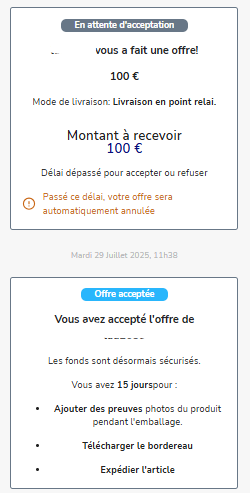
If you want to decline the offer, you can do so via Troc Vélo messages.
If you want to lower the price of your listing after a negotiation, you must edit your listing directly via "My account" → "My listings" → "Edit". Go to the "Estimate your bike's value" step, enter the agreed price, then click "Confirm", then "Confirm and publish".
Changing a listing's price may require a check by our moderation team. This generally takes no more than 24 hours on working days.
Once your listing is back online, you will need to accept the offer at the agreed price via Troc Vélo messages to start the transaction and shipping procedure.
3. Sending the parcel with Mondial Relay:
Once you are sure your product is still available, you can start packing it for shipping within two weeks. After this time, the transaction will be automatically cancelled and the buyer refunded.
Here are the steps to follow to send the parcel:
Pack your parcel carefully so that it is not damaged during transport. Please note:
- Maximum weight: 30 kg
- Maximum length: 120 cm – Length + width + height: maximum 150 cm – Download the shipping label from Troc Vélo messages.
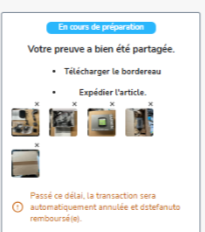
Stick the shipping label legibly on the parcel.
Drop your parcel off at a pickup point. (The delivery fees are paid by the buyer, you will not be asked for any payment.)
Confirm to the buyer that the parcel has been sent using the dedicated panel in Troc Vélo messages. (If you have chatted with the buyer in the meantime, the panel may have moved up in your conversation.)
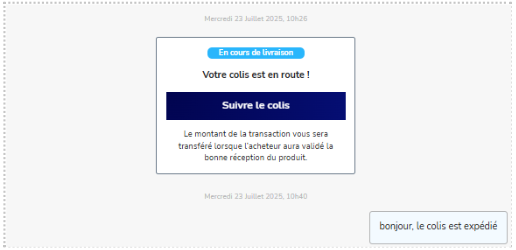
4. The parcel has been received!
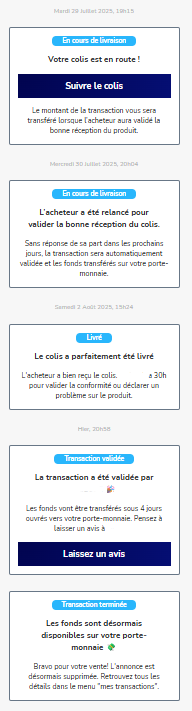
Once the parcel has been collected by the Pickup Point, you have nothing more to do. The buyer is kept informed of the parcel's transit, from dispatch to arrival, via Troc Vélo messages, the tracking number and by email from Mondial Relay. Important: The time a parcel is held at a Mondial Relay Pickup Point or Locker is now 5 calendar days from its arrival. After this time, the parcel will be automatically returned to the sender.
Once the parcel has been received, the buyer has 72 hours to confirm receipt and confirm that the parcel matches the listing. Once the buyer has completed these steps, the transaction funds are paid into your Troc Vélo wallet and all you have to do is transfer them to your bank account (How do I withdraw the money in my Troc Vélo wallet?). To do so, your account must have been verified by submitting an ID document and bank details (IBAN).
Valuable item? Insure your parcel!
At Troc Vélo, we know that many transactions, and therefore parcel shipments, involve high-value equipment: complete bikes, components, carbon wheels, GPS units…
Whether you are in Switzerland, Belgium, Luxembourg, Germany or France, protecting your parcel during transport is essential. And nothing is more effective than the carrier's insurance. Further down in this article, you will find when and how to take out insurance.
In this document, we explain how insurance works depending on the carrier and the value of your parcel. The carriers concerned are: Mondial Relay, Chronopost, Colissimo, Colis Sport, VPost, UPS/DHL, Swiss Post, Post Luxembourg.
Why take out transport insurance?
When the seller ships, sending a product without insurance means risking losing everything in case of damage or loss. Carriers do their best to deliver parcels in the best possible conditions, but the unexpected happens:
- A parcel that is mishandled,
- A parcel damaged in transit,
- A parcel lost in a warehouse or wrongly labelled,
With carrier insurance, you are financially covered according to the value of the item shipped. This lets you obtain suitable compensation if something goes wrong.
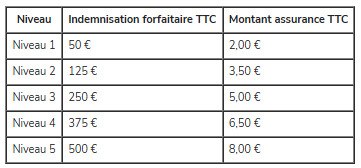
Mondial Relay
When to take it out: When creating the shipping label via their website or via an integrated marketplace such as Troc Vélo.
How to take it out:
- Insurance is offered as an option before paying for the label.
- Several tiers are available (up to €1,500 depending on the option).
- You must declare the value of the item and keep proof of purchase.
Good to know:
- In case of a claim, you must file a claim within 14 days with proof of value and a photo.
- The investigation takes about 10 to 15 working days.
Mondial Relay price table :
Chronopost
When to take it out: When creating the label, whether on the website or via a partner platform.
How to take it out:
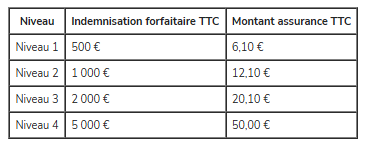
- Chronopost includes flat-rate compensation of €250 per parcel.
- For a higher amount, you must take out the Ad Valorem option (declared value).
- This insurance is available up to €20,000 (depending on the nature of the contents).
Good to know:
- It can only be taken out before the parcel is dropped off.
- An invoice or proof of purchase is essential in case of a dispute.
- Claims must be made within 21 calendar days after delivery or disappearance.
- Investigation time: around 15 working days
Chronopost price table :
Colissimo :
When to take it out: At the time of postage, online or at the counter.
How to take it out:
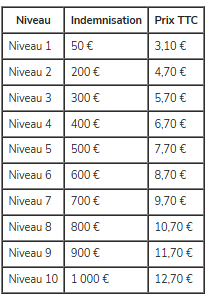
- Standard insurance covers up to €23/kg.
- The "declared value" option lets you insure up to €5,000.
- It is activated online or at a post office with proof of value.
Good to know:
- Claims must be filed within 30 days.
- Investigation time: 21 days on average.
Colissimo price table :
Colis Sport :
When to take it out: When posting your parcel on the website or via the partner interface (e.g. Troc Vélo).
How to take it out:
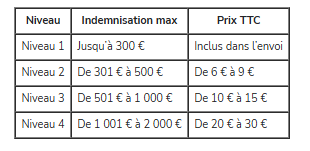
- Insurance up to €5,000 depending on the rate chosen.
- The option is shown when choosing the shipping method (optional insurance).
- Proof of value is required for any claim.
Good to know:
- Claims must be filed within 7 working days.
- Average processing time: 10 to 15 days.
Colis Sport price table:
Bpost :
When to take it out: When posting the parcel via the app or at the counter.
How to take it out:
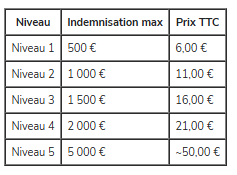
- Several registered-mail levels (R1 to R3) or declared-value insurance (up to €5,000).
- Option to tick when buying the shipping label.
Good to know:
- Claims must be made within 30 days.
- Investigation time: 10 working days.
B post price table :
UPS/DHL :
When to take it out: When booking the shipment on the UPS or DHL websites, or via a partner.
How to take it out:
- Insurance (called "declared value") is ticked while preparing the label.
- Proof of value required.
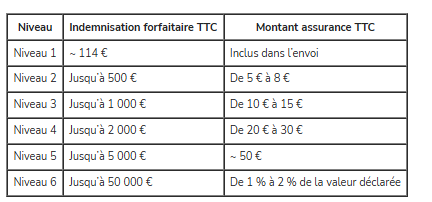
- Maximum insured amount: up to €50,000 (UPS) or €25,000 (DHL), depending on the declared value.
Good to know:
- Claims must be made within 14 days.
- Investigation time: 7 to 10 working days.
UPS / DHL price table :
Swiss Post :
When to take it out: At the time of postage, online or at the counter.
How to take it out:
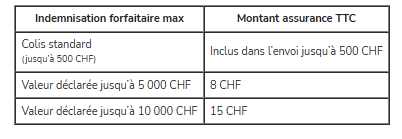
- Basic cover (up to CHF 500) included in some services.
- Declared-value option up to CHF 10,000.
- Proof of value is mandatory.
Good to know:
- Claims must be filed within 8 days (damage) or 30 days (loss).
- Investigation time: around 10 working days.
Swiss Post price table :
Post Luxembourg :
When to take it out: At the time of postage at the counter or via the MyPost online portal.
How to take it out:
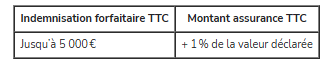
- The SecurPack option lets you insure a parcel up to €10,000.
- Fixed rates by bracket (e.g. €10 up to €1,000, €100 up to €10,000).
- The option includes tracking and delivery against signature.
Good to know:
- Claims must be made within 30 days with supporting documents.
- Investigation time: 10 working days.
Post Luxembourg price table :
At Troc Vélo, we strongly encourage the use of carrier insurance for any shipment of a valuable item. A bike, a pair of wheels or a GPS unit is often worth a significant amount: it would be a shame to lose everything to save a few euros.
Thanks to delivery by the seller offered on Troc Vélo, and the cover provided by recognised carriers such as Mondial Relay, Chronopost, Colissimo, Colis Sport, VPost, UPS/DHL, Swiss Post or Post Luxembourg, you have everything you need to make sure your parcel arrives complete and in good condition at its new owner's door!
Buy on Troc Vélo with secure payment 🔒
How do I buy an item from a listing on Troc-Vélo?
To buy on Troc Vélo, simply create an account, then search for the item you are interested in. Once you have found it, click the "Buy now" button on the listing. You will then be guided step by step through to the completion of the transaction.
The "Buy now" button only appears if the seller offers secure payment. If it is missing, it means the seller does not wish to use the Troc Vélo secure payment method. In that case, we recommend contacting the seller using the "Contact" button to agree on the payment and delivery arrangements.
How does a transaction with Secure Payment work?
When you click the "Buy now" button on a listing, you will be taken to a checkout process.
Select the delivery method from those available. Enter your bank details so that your funds are secured throughout the transaction.
The seller accepts your offer, you are charged and the money stays secured until the end of the transaction. After that, all the steps take place in the messages. Once the parcel has been handed over or received, you confirm this in your conversation with the seller and your funds are then released and paid into the seller's Troc Vélo wallet.
How can I avoid scams and buy safely?
To avoid any unpleasant surprises with your purchase, you will find plenty of advice in this article.
Buying online from private sellers can carry risks and we strongly advise you to complete the transaction using Troc Vélo secure payment. With our secure payment, you can follow the status of your transaction at any time. The transaction funds will be paid into the seller's Troc Vélo wallet once you have confirmed that the parcel arrived safely and that the product is as described.
In all cases, be vigilant and check the user's profile, their reviews, and the consistency of the information they share with you about their identity and their product. If you have any doubts, our team is available to check the profiles you report to us.
Why buy with secure payment?
Secure payment is a service offered by most platforms for sales between private individuals. It is a paid service whose purpose is to guarantee the buyer's safety. If you use secure payment, the transaction amount is held in a third-party account until the transaction is validated. If you do not receive the parcel, you get 100% of the transaction amount back, and you have recourse if the parcel you receive does not match the listing. It is the best way to protect yourself from potential scam attempts on platforms between private individuals, and we strongly recommend using it. Encouraging you not to use secure payment is one of the suspicious behaviours that should alert you and be reported to the moderators whenever possible.
All sellers can use secure payment, whether they are private sellers or businesses.
Why buy on Troc-Vélo?
REASON #1: Troc-Vélo is the largest catalogue of bike classifieds, with 60,000+ listings of bikes and outdoor equipment available online every day. Whether you are looking for a complete bike, specific parts to maintain or repair your bike, or gear to protect and equip yourself for your rides: on Troc-Vélo, you are sure to find what you need.
REASON #2: Troc-Vélo is the only specialist platform that lets you buy and sell your equipment with no extra fees if you wish. You are free to choose the payment / delivery combination that seems best suited to your purchase. For your safety, we also offer a secure payment solution that protects you in particular if the parcel is not received. It is a paid service that remains optional.
REASON #3: Troc-Vélo is a community of enthusiasts and experts who have been exchanging for 18+ years. It is, together with VéloVert's, the most active forum on the subject in France. There are hundreds of thousands of cycling enthusiasts ready to give you advice and guide you in your purchases: Join our Community!
How can I tell if a bike is stolen?
When buying second-hand, you need to be vigilant and take care not to unknowingly buy a stolen bike. Fortunately, most recent bikes now have an identification number. This number makes it possible to trace the bike. These numbers are collected in the Fichier National Unifié des Cycles Identifiés (FNUCI), with a status for each bike.
Before buying, we therefore recommend asking the seller for the bike's marking number. If the bike is marked, then check its status in the FNUCI; it should normally be "for sale". If it is declared "stolen, lost": do not buy it and report the listing.
If you are selling your bike and it is not marked, we strongly advise you to have it marked: it builds trust with your buyers. Bike marking costs between €10 and €30 and you will find the list of approved operators on the APIC website.
Is the seller notified that I made an offer?
When you make a purchase offer, the seller is notified in their messages and a conversation with them is opened. The seller has 72 hours to accept or decline your purchase offer. During this period, they receive several reminders. If they do not reply within this time, the transaction is cancelled automatically and the card authorisation hold on your account is released. If they accept the offer, the card authorisation is then charged and the funds are held securely by our banking partner for the whole duration of the transaction.
The seller can't find my purchase offer?
When a purchase offer is made with Troc Vélo secure payment, a conversation is automatically and directly opened with the seller in your Troc Vélo messages.
The seller isn't replying to my offer or has declined my purchase offer?
When you make a purchase offer via Troc Vélo secure payment, if the seller declines your offer or does not reply within 72 hours, the transaction is cancelled and the card authorisation hold on your account is released.
How do I pay in instalments?
Paying in instalments is not currently available on Troc Vélo. But don't worry, this feature is planned and will be available soon.
What should I do if I do not receive the item I bought?
Purchase with Troc Vélo secure payment
If you used Troc-Vélo secure payment, we recommend following this link to read all our articles that will answer your questions about this payment method: read the articles. If you do not receive the item bought via secure payment, please follow these steps:
- First, use the parcel tracking link to check where it is. Sometimes shipments can take longer;
- Then, if the item is lost or you have had no news of the shipment for several days or weeks, please open a dispute from your conversation with the seller;
- Then click "I have a problem"
- Select the reason "I did not receive the item" Once you have completed these steps, we will receive an alert. We also invite you to open an investigation with the chosen carrier if it is a Troc Vélo secure payment transaction with delivery by the seller (carrier chosen by the seller). If it is a transaction with integrated Mondial Relay delivery, we will carry out the investigation on our side with their service. Please be patient in this case, as claims can take a long time.
Purchase without secure payment
If you did not use secure payment, we unfortunately cannot cancel the transaction and have no recourse in the event of a parcel not being received.
We would like to remind you that Troc-Vélo provides a service for posting and browsing classified ads and that, as such, Troc-Vélo does not intervene in transactions between buyers and sellers. In the event of a dispute with a seller, we invite you to submit a claim to the seller by registered letter with acknowledgement of receipt. If there is no reply, you can file a complaint at your local police station or gendarmerie; this can be preceded by an online pre-complaint.
What should I do if the item I received does not match its description?
Purchase via Troc Vélo secure payment
If the item bought via Troc Vélo secure payment does not match its description, please follow these steps:
- Open a dispute from your conversation with the seller;
- Then click "I have a problem"
- Select the reason "Item not as described" Once you have completed these steps, we will receive an alert. After opening the dispute with the seller, we invite you to try to reach an amicable solution to resolve it. This could be:
- A return of the item: to be agreed with the seller (who covers the return costs? Shipping arrangements, etc.).
- A price reduction: if the seller agrees to keep the item, a discount can be agreed between you.
Troc Vélo will step in if no agreement is reached between the two parties.
If you used Troc-Vélo secure payment, we recommend following this link to read all our articles that will answer your questions about this payment method: read the articles.
Purchase without secure payment If you did not use secure payment, we unfortunately cannot intervene in the transaction. If the seller is a business, you have a statutory 14-day right of withdrawal. If the seller is a private seller, the only option is an amicable agreement with the seller.
How much does secure payment cost as a buyer?
As a buyer, buyer protection fees may apply in some cases.
- If you transact with a private seller, the fixed fee is €0.99, plus buyer protection.
- If you transact with a business, the fee is only €0.99.
All these fees are shown when you enter your bank details. They allow you to benefit from buyer protection.
How do I cancel a transaction as a buyer?
As a buyer, you can cancel a transaction:
- As long as the seller has not accepted your purchase offer, for a transaction with delivery by the seller. Please note that once your purchase offer has been accepted, you are committed to the seller and can no longer cancel your purchase;
- Or as long as you have not validated the exchange, for a transaction with in-person handover. You will be automatically refunded within a few days to your original payment method.
Can I negotiate the price or make an offer?
There is currently no negotiation feature. However, you can always agree on a new price by chatting in Troc Vélo messages. Once you have agreed, the seller will need to edit the listing to adjust the price. The buyer can then proceed to pay for the listing. ⚠️ You can cancel a pending purchase offer if you want to change the price by clicking the "Cancel transaction" button after clicking the three small dots at the top right of the messages.
How can I tell if a seller is reliable?
To find out whether a seller is reliable on Troc Vélo, we recommend checking several things:
- Look at their profile: read the reviews left by other buyers, as this will give you an idea of how trustworthy they are.
- Check how long they have been registered: an account that has been active for a long time is often a good sign.
- Favour secure payment: it is the best guarantee, because the funds are held until you confirm that the product you received matches the listing.
- Communicate through Troc Vélo messages: this protects you and keeps a record in case of a problem.
What payment methods are available?
Only single-instalment payment by bank card is available. The accepted cards are:
- Bank card
- Visa
- Mastercard
We will soon offer payment in instalments and by bank transfer.
⚠️ For the moment, you cannot use your Troc Vélo wallet to buy products.
Buying with integrated Mondial Relay delivery
The steps of a purchase with Troc Vélo secure payment and Mondial Relay delivery
1. Do you like a product? Make an offer!
If a product interests you on Troc Vélo, click on the listing. After viewing it, if the price suits you, click "Buy now" to see the total price, including:
- The product price
- The buyer protection fee
- The delivery fee
If the product price doesn't suit you, you can negotiate it with the seller to agree on a price that works for both parties. To do so, just click "Contact" to send them a message with your questions and your first price proposal.
Once an agreement has been reached and the listing updated, click "Buy now" again. The new price will be applied, with the buyer protection fee and the delivery fee added.
To benefit from Mondial Relay delivery, the listing must be enabled with Troc Vélo secure payment and Mondial Relay delivery.
The shipping fees are set according to the price table below:
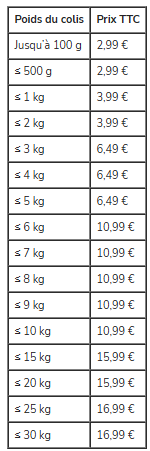
When your offer is made, including the product price, the protection fee and the delivery fee, a hold is placed on your bank account. It will be charged once the seller has accepted your offer.
If the offer is declined by the seller or is not accepted within 72 hours, the bank hold will be automatically released.
2. Sending the parcel
Once the seller has accepted your offer made via Troc Vélo messages, the funds will be held by our payment provider while the parcel is in transit.
The seller will pack the parcel and drop it off at the Pickup Point or Locker nearest to them, destined for the pickup point you chose to receive your purchase. The Mondial Relay delivery service lets you send and receive parcels from more than 11,000 pickup points and Lockers in mainland France, Corsica and Belgium, with an average delivery time of 3 to 5 working days. You can receive Belgian parcels while living in France and French parcels while living in Belgium. Mondial Relay is also available for transactions within Belgium. You therefore have a wide choice of pickup points close to you.
When the parcel is collected by Mondial Relay, a number is assigned to it: this is the "parcel number". To track your parcel, you can:
– Go to the Mondial Relay website via the link that will be sent to you in Troc Vélo messages. – Use the Mondial Relay app by entering the parcel tracking number that will have been sent to you in your Troc Vélo messages.
To find out where your parcel is, enter the parcel number in the search bar provided, along with the parcel's destination postcode, on the Mondial Relay website or app.
Once the parcel has been collected by Mondial Relay, you will be notified via your Troc Vélo messages as well as by email, at the address linked to your Troc Vélo account.
3. Your parcel has arrived!
Once your parcel has arrived, you will be notified by email and via your Troc Vélo messages. You can then collect your parcel from the Pickup Point or Locker you chose. Important: The time a parcel is held at a Mondial Relay Pickup Point or Locker is now 5 calendar days from its arrival. After this time, the parcel will be automatically returned to the sender.
After you show an ID document (identity card, passport, driving licence) or provide your collection code (received by email and via Troc Vélo messages), the shopkeeper will hand over your parcel.
4. Unpack your parcel!
After receipt, you have 72 hours to confirm that the product matches the listing. Once this confirmation is done, the funds will be released and sent to the seller's Troc Vélo wallet.
If no action is taken within this 72-hour period, the product will be automatically confirmed as matching and the funds will be sent to the seller.
If the product does not match the listing or the product described by the seller, you can start a dispute procedure.
Reviews and Reports 👌
I have a negative review and I would like to delete it. What should I do?
We do not delete reviews, except in cases of defamatory abuse or if there was no transaction. If this applies to you, please send us a message at contact@troc-velo.com explaining the situation and why this review was unfairly posted on your account. Our administrator team will contact you directly to find a solution.
How do I leave a review for a seller after a transaction?
Reviews on profiles are very important and can reassure or warn a Troc-Vélo user about another user's past transactions. That is why we invite you to leave a comment on a user's profile as soon as you have completed a transaction with them.
To leave a review, go to their profile, then click the "Reviews" tab before clicking the "Leave a review" button. You will then be able to rate the user and leave them a comment:
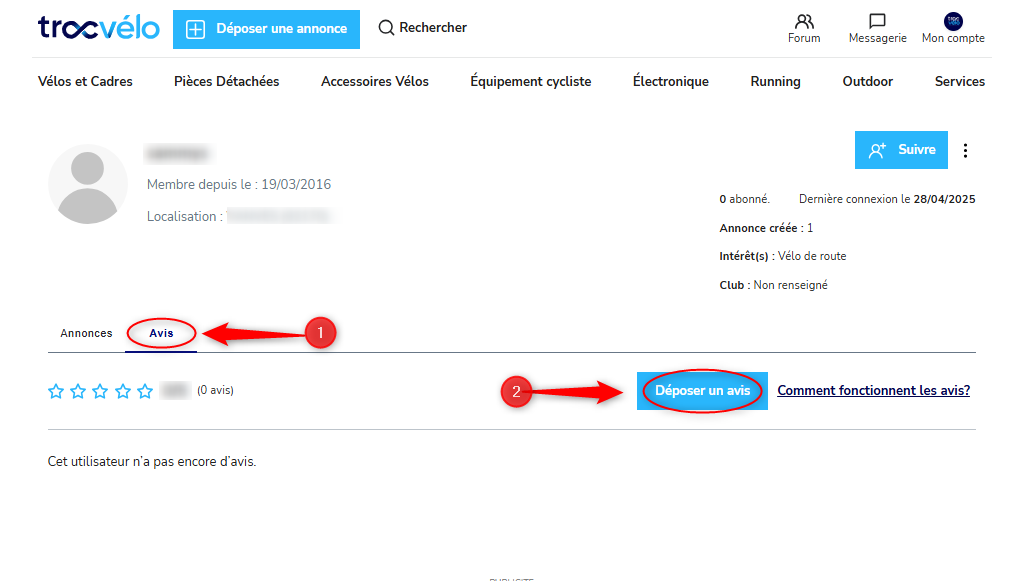
The user will be able to reply to your review afterwards.
I left a negative review and would like to edit it. What should I do?
You can edit or delete a review you have left on a profile at any time. To do so, simply go back to the profile of the user in question, go to the "Reviews" tab and find your review so you can edit or delete it. ⚠️ Only one review can be posted per profile. So if you carry out a new transaction with the same user, we recommend editing your review to reflect your latest experience with that user.
How and why should I report a listing?
Does a listing look fraudulent to you?
Have you already seen this listing being sold by other sellers on other platforms?
Does it look like a counterfeit?
Do you have doubts about where the product comes from?
Does the listing breach Troc-Vélo's terms and conditions?
You can Report the listing directly from the product page:
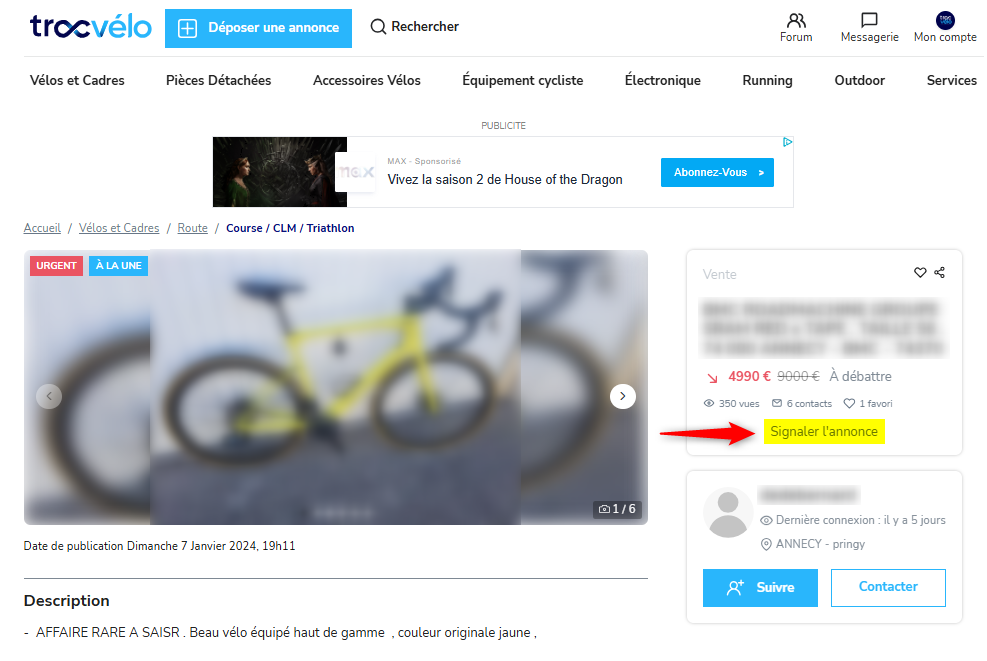
Our moderator will check the listing and the seller and take the necessary measures — blocking, deletion, or other action – if your suspicions are confirmed.
Reports from our users play an active part in keeping the platform safe, and we sincerely thank you for them.
How and why should I report an account?
Have you spotted a suspicious account (identity theft, attempted fraud, illegal content or content that breaches our terms and conditions, violent, aggressive or discriminatory messages...)?
You can report a user from their public profile.
To reach their profile, you can search for their username with the search engine, click on their username from their listings, or find them in your conversation. Once on the seller's account, click the three small vertical dots at the top right of the "Information" block, then "Report profile". Any information you can give us about the reasons for your report will help us handle it quickly and efficiently and clean up our community.
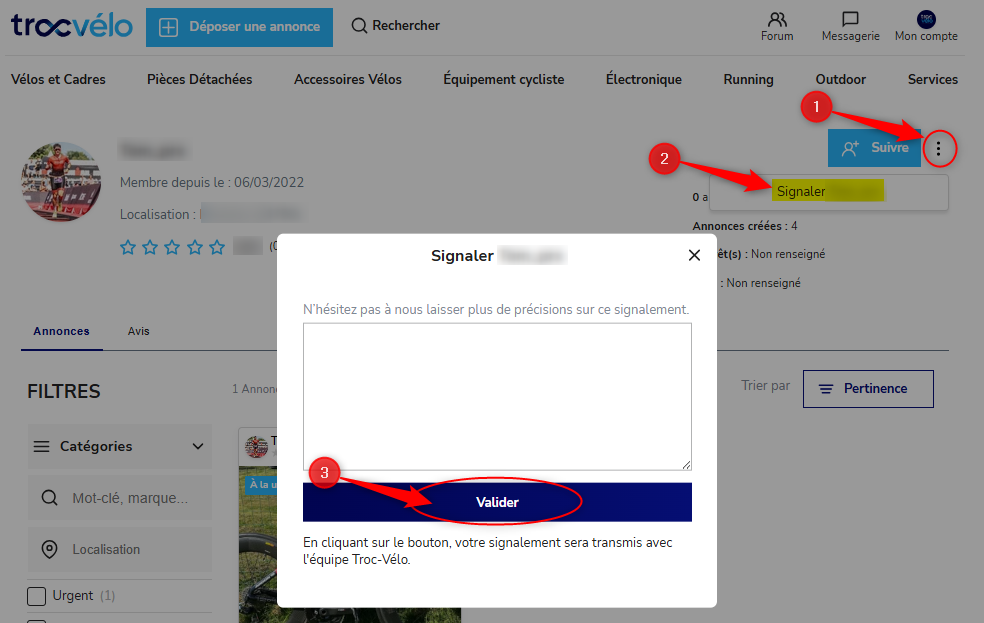
Our moderator will take your request into account, check the user's account and take the necessary measures.
Reports from our users play an active part in keeping the platform safe, and we sincerely thank you for them.
Why leave a review after a transaction?
On a web platform for sales between private individuals, most of the time you do not know the person you are going to buy from or sell to.
Leaving a review after a transaction on the profile of the seller or buyer you dealt with is very important: it will reassure the next users who interact with that profile. It is also an opportunity to point out the areas for improvement of the profile, if you have identified any. This public feedback contributes to the daily improvement of the quality of exchanges and transactions on our platform.
How recent the reviews are, how many there are and their quality are all factors to consider when assessing a profile.
You can also choose to leave a negative review on a profile you suspect of fraud or illegal activity, in order to warn other users. However, for security reasons, we strongly encourage you to use listing and profile reports instead, which remain anonymous for the user concerned and allow our team to carry out the appropriate checks.
How and why should I report a message in the Forum?
In the Forum, you can "Report a message".
You can do so if:
- a user behaves disrespectfully (insults, racism, sexism...)
- a user is canvassing in bulk via the Forum
- you want Troc-Vélo to see and respond to a specific message
The Troc-Vélo Forum is above all YOUR Forum and reporting abusive behaviour helps you keep a friendly, respectful and open space for exchange between enthusiasts.
Other questions ❓
Is there a Troc Vélo mobile app?
The Troc Vélo app is now available on Android and iOS.
The app is now available on the Play Store. Download it now!. You can also find us on the App Store! Download the app now!
🚀 Why download the Troc Vélo app?
- 📩 Push notifications so you never miss anything: messages, offers, favourites...
- 🔎 Faster, smoother browsing, designed for your searches.
- 🚲 Thousands of listings at your fingertips, anywhere and anytime.
Enjoy an optimised experience with:
Join us on the app and experience Troc Vélo like never before!
What is the bike identification number or bike marking?
The identification number is a string of 10 alphanumeric characters. Marking means assigning an identification number to a bike: only approved operators can carry out this operation. The list of approved operators is available on the APIC website.
Marking or identifying the bike has been mandatory for a new bike since 1 January 2021, and since 1 July 2021 for a second-hand bike bought from a business. This obligation also applies to bikes sold by traders on the internet. Proof of identification must be handed to you in person when you buy your bike from a business.
This identification number and the owner's contact details are recorded in a database called the Fichier National Unifié de Cycles Identifiés (FNUCI), which is accessible online at www.apic-asso.com
Each identification number is associated with a bike status. This allows owners to declare their bikes if they are stolen or lost, for example. It is a way of limiting the handling of stolen bikes and fraud.
We advise you to have your bike marked before putting it up for sale if it is not already marked: it builds trust. As a buyer, we advise you to ask the seller for this number so you can check the number's existence and status in the APIC database, to protect yourself against receiving stolen goods.
How does the referral programme work?
Referral means inviting a person (your referee) to use Troc-Vélo. For someone to become your referee, they must not already have a Troc-Vélo account. Referring someone is rewarded, because you help us grow the community with trustworthy people.
- As a referee, I get 5 credits after my first listing, if it is posted within 30 days of receiving the email. My account is credited automatically 24 hours after the listing is published, provided it is not deleted within that time.
- As a referrer, I receive 10 credits if my referee has published a listing within the following 30 days. My account is credited automatically 24 hours after my referee's listing is published, provided it is not deleted within that time.
To refer someone, go to the Referral page in your account, then enter your referee's email address.
Why sell on Troc-Vélo?
REASON #1: Troc-Vélo is the largest catalogue of bike classifieds, with 60,000+ listings of bikes and outdoor equipment available online every day. With over 1 million page views every week, Troc-Vélo is the leader in online bike classifieds. You too, sell on Troc-Vélo!
REASON #2: Troc-Vélo is the only specialist platform that lets you sell your equipment with no extra fees if you wish. You are free to choose the payment / delivery combination that seems best suited to your sale.
REASON #3: Troc-Vélo is a community of enthusiasts and experts who have been exchanging for 18+ years. By selling on Troc-Vélo, you join a community. You build a reputation and a brand image thanks to Seller Reviews and the Forum, which, together with VéloVert's, is the most active forum in the cycling community: Join our Community!
Is there a phone number to contact customer service?
No, we do not have a customer service phone number. However, our team is available in writing via the contact form to answer all your questions.
Please note that, where necessary and to help resolve complex situations, we may call our users.
⚠️Please note that we will never call you to validate a secure payment transaction. Stay vigilant: if you receive a suspicious call asking for your bank details or for unusual actions, never go along with it and contact us immediately.
Managing my listings 📝
What does the "Featured" badge mean?
A listing with a "Featured" badge means that the seller has paid for a 'Top of category' boost option on their listing in order to sell it faster.
How do I deactivate my listing?
On the "My listings" page you will see all your listings currently online on Troc-Vélo (as well as deactivated or expired ones). You can then delete or deactivate them. When you deactivate a listing, it is no longer visible to other users, but it is not deleted. This means you can reactivate your listing at any time to resume the selling process.
How do I post a listing?
To post a listing, create your account or log in to your Troc Vélo account and follow this link. Then click the "Post a listing" button at the top left on a computer, or in the left-hand menu on your phone. All you have to do is follow the steps and confirm your listing.
How do I promote my listing with the boost options?
Want to sell your item faster? We recommend taking out a boost option for your listing. Troc-Vélo offers several boost options (Top of category, Top of list boost, Urgent ...) whose prices and workings are set out in the terms and conditions. You can also ask for more information by emailing contact@troc-velo.com; our team is here to help.
You can add a boost option either when creating your listing, just before confirming it, or at any time from your account in the My listings section by clicking the "Sell faster" button.
Choose the duration of the option you want to apply (the Urgent option is valid for the whole time your listing is visible).
Select a payment method (bank card, PayPal, etc.)
And you're done!
Happy selling on Troc-Vélo!
How do I change the category of my listing?
You cannot currently change the category of your listings yourself on Troc Vélo.
If you realise that you posted your listing in the wrong category, please send a message to the Troc-Vélo team at the following email address: contact@troc-velo.com. We will make the necessary changes to make sure your listing gets the visibility it deserves.
How do I add photos to my listing?
You can add photos to your listings when posting or editing a listing, in the "Product photo" section. Each listing can have up to 10 photos at no charge. The number of photos uploaded is shown in a counter at the bottom right of the main image. Photos can be uploaded from your computer folders or your mobile photo gallery, or taken directly with your mobile phone.
I want to edit my listing or its price: how do I do that?
To change the price of your listing, go to your Troc-Vélo profile by clicking My account. Access your listings by clicking the arrow on the "My listings" block. To edit a listing, simply click the pencil icon shown on the thumbnail of the listing in question. At present, editing requires going back through each step of the listing process one by one. This is something that should improve soon.
I want to delete my listing, how do I do that?
On the "My account" page, go to the "My listings" section. You will see all your listings currently online on Troc-Vélo. Simply click the small "bin" icon at the top right of the listing you want to delete.
Why do my listings have an expiry date (PRIVATE SELLERS)?
Private sellers' listings are posted for 120 days to keep the catalogue as up to date as possible. Listings generally sell within a few weeks. If your listing has not sold after 120 days, you can easily extend it for free.
My listing isn't selling: what can I do?
On Troc-Vélo, an item sells in a few days on average.
If your sale is taking a while, please check the following points: Is your item in the right category? If not, potential buyers won't find it. You can ask us to correct the categorisation of your item by emailing contact@troc-velo.com
Is your listing attractive?: Do you have a clear title? Are the photos of the item good and plentiful? You can add up to 10 photos, so make the most of it! Is your description complete and accurate? Have you filled in the technical specifications of your item? Without them, your listing will not appear when users filter listings.
Is your listing's price in line with similar listings? A price that is too high is a clear barrier to buyers getting in touch when buying second-hand. Conversely, a price that is too low is often a warning sign and may suggest potential fraud.
Does your seller account inspire confidence?: Have you left your phone number visible? Have you asked your previous buyers for reviews? Do you reply quickly and politely to potential buyers? Do you offer secure payment? Do you accept returns?
Once you have checked all these points and are sure your listing is fully optimised, you can share it on your social media if you want to give it more exposure. We also offer (paid) options to boost your listings and speed up the sale. Always make sure to optimise your listing first, though: it will be your best sales driver!
Happy selling on Troc-Vélo!
My listing is "Pending validation": why, and when will it be published?
We manually check some listings. The criteria used to choose which listings are checked manually change over time. If your listing is "Pending validation", it means it will be checked manually by our team. Don't worry! Unless your listing is fraudulent, it should be published within the day. It may occasionally take a little longer.
I want to deactivate my listing because I won't be able to reply to enquiries, can I deactivate it without deleting it?
On the "My account" page, go to the "My listings" section. You will see all your listings currently online on Troc-Vélo. You can delete or deactivate them. When you deactivate a listing, it is no longer visible to other users, but it is not deleted. This means you can reactivate your listing at any time to resume the selling process.
Should I have my bike marked?
If you are selling your bike and it is not marked, we strongly advise you to have it marked: it builds trust with your buyers. Bike marking costs between €10 and €30 and you will find the list of approved operators on the APIC website. This number makes it possible to trace the bike. These numbers are collected in the Fichier National Unifié des Cycles Identifiés FNUCI, with a status for each bike: this helps limit the handling of stolen bikes and fraud.
How can I get my listing posted on Troc Vélo's social media?
To get your listing reshared on our social media, it is very simple: just take a nice photo of your bike or equipment for sale, then tag us in your posts or stories.
As soon as we see it, we can repost it as an Instagram story and on Facebook to our community of nearly 40,000 followers in total! This will considerably boost your listing's visibility and increase your chances of selling quickly.
Don't hesitate to mention us and show off your listing.
How do I find my expired listings?
To find your expired listings and extend them, simply go to your "My listings" page, then to the "Expired" tab. In this view, you will find your expired listings. Click 'Extend my listing' to put it back online for 120 days.
Why was my listing deleted?
We reserve the right to delete a listing for several reasons, including:
- If the listing concerns a counterfeit or non-compliant product,
- If the content is inappropriate or does not comply with our posting rules,
- If the product for sale has no connection with cycling, outdoor or running,
- If the listing is deemed misleading, incomplete or contains false information,
- If it contains elements that are contrary to the law or to our Terms of Use.
We may occasionally make an error of judgement. In that case, don't hesitate to contact us so that we can review your situation and, if needed, allow you to repost your listing.
Expédié et recevoir un vélo via Cocolis 🚚
Expédié via la livraison Cocolis
La livraison Cocolis vous permet de faire transporter votre vélo par un particulier ou professionnel qui effectue déjà le trajet entre votre ville et celle de l'acheteur — une solution flexible pour les objets encombrants ou fragiles, avec un enlèvement directement à votre domicile.
💡 Bon à savoir : les frais de transport sont à la charge de l'acheteur. Vous ne payez rien en tant que vendeur particulier.
Prérequis
- Activez la livraison Cocolis lors du dépôt de votre annonce
- Vérifiez que votre adresse de départ est correcte et joignable pour un enlèvement
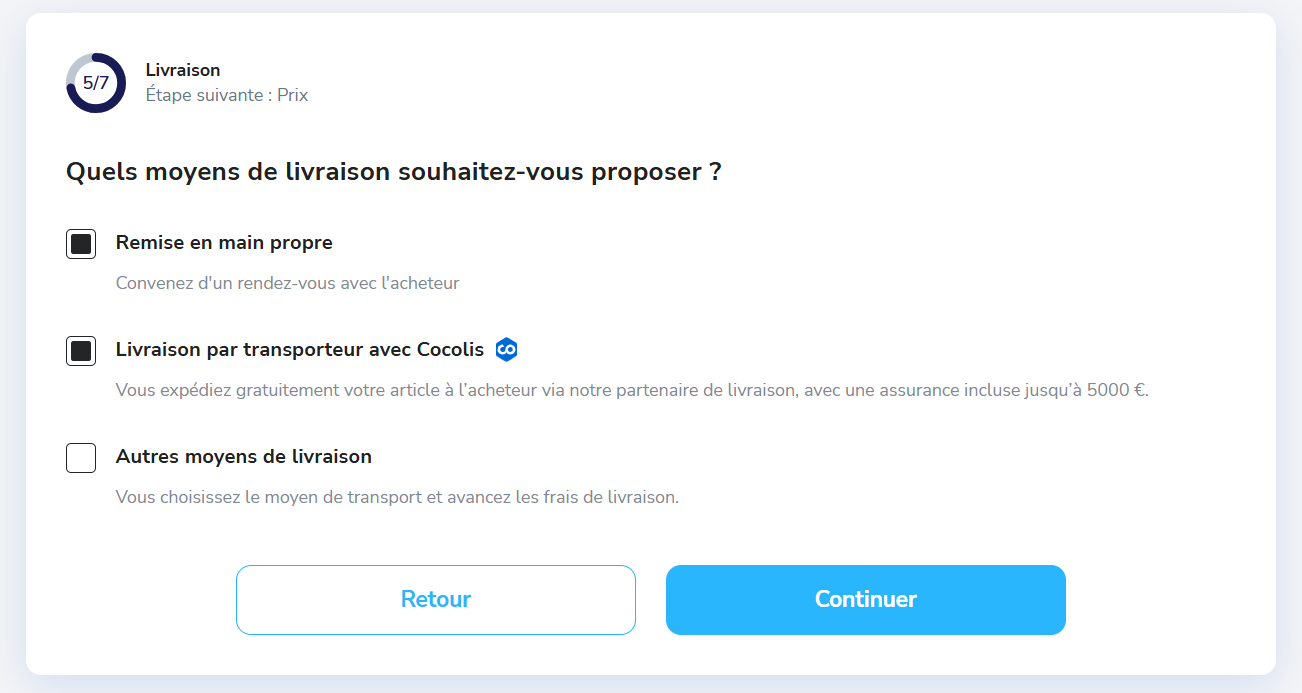
Les étapes d'une vente
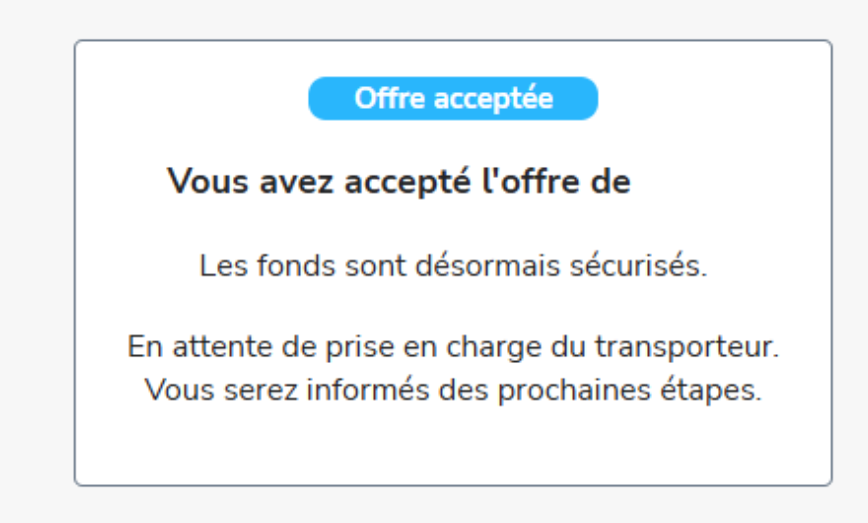
Étape 1 — Recevoir et accepter une offre
Vous disposez de 72 heures pour répondre à une offre d'achat.
- ✅ Vous acceptez : la commande est confirmée
- ❌ Vous refusez ou ne répondez pas : l'offre est annulée
💡 Bon à savoir : vous pouvez ajuster le prix de votre annonce à tout moment depuis « Mes annonces » tant qu'aucune offre n'est acceptée.
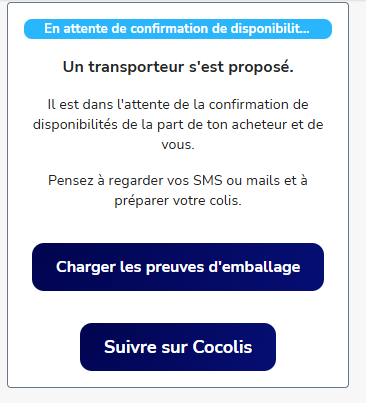
Étape 2 — Un transporteur se positionne
Une annonce de transport est publiée sur Cocolis : un co-transporteur se positionne sur le trajet, puis Cocolis vous contacte — vous et l'acheteur — par e-mail et SMS pour caler ensemble un créneau de récupération du colis et de livraison.
💡 Bon à savoir : le montant de la livraison est payé par l'acheteur, vous n'avez aucun frais à avancer.
📸 [Capture d'écran : messagerie Troc Vélo avec les propositions des transporteurs Cocolis]
Étape 3 — Emballer et remettre le vélo
- Emballez soigneusement le vélo (carton, papier bulle, protections sur les points fragiles — dérailleur, freins)
- Démontez les pièces saillantes (pédales, guidon) si le transporteur le demande
- Prenez 3 photos du vélo emballé avant la remise : elles seront indispensables en cas de litige avec l'assurance
- Remettez le vélo au transporteur au créneau convenu
⚠️ Attention : un vélo endommagé pendant le transport faute d'un emballage suffisant ne pourra pas être couvert par l'assurance Cocolis (https://www.cocolis.fr/guide-emballage)
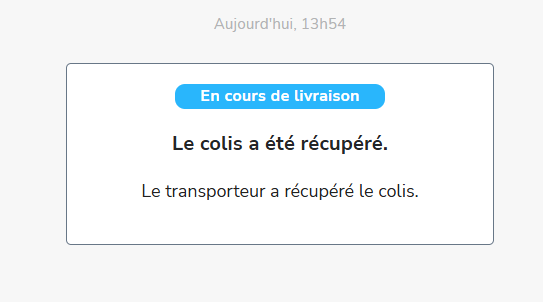
Étape 4 — Suivre l'acheminement
Suivez l'avancement via la messagerie Troc Vélo depuis le lien de suivi. Les délais varient selon le trajet et la disponibilité du transporteur choisi.
Étape 5 — L'acheteur valide la réception
L'acheteur dispose de 5 jours après réception pour signaler un problème éventuel.
- ✅ Validation ou absence de litige : les fonds sont transférés sur votre porte-monnaie Troc Vélo
- ⚠️ Litige : la transaction est en suspend jusqu'à résolution du litige.
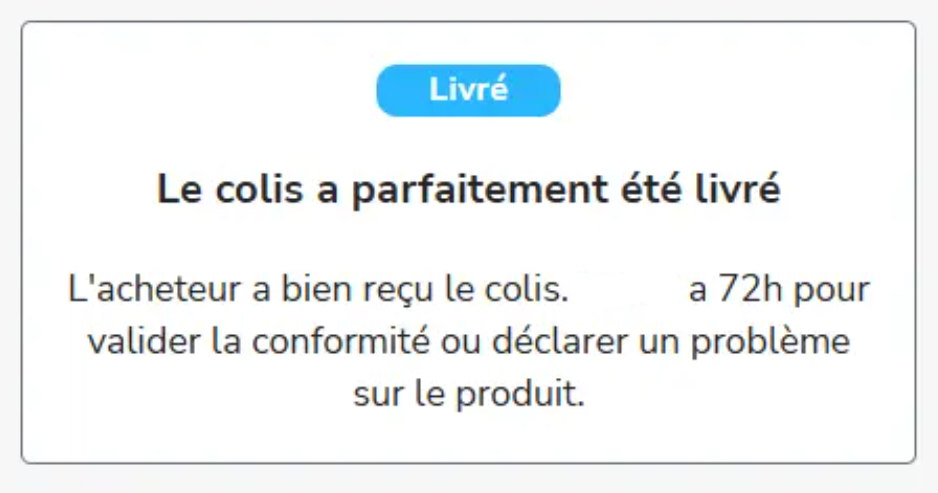
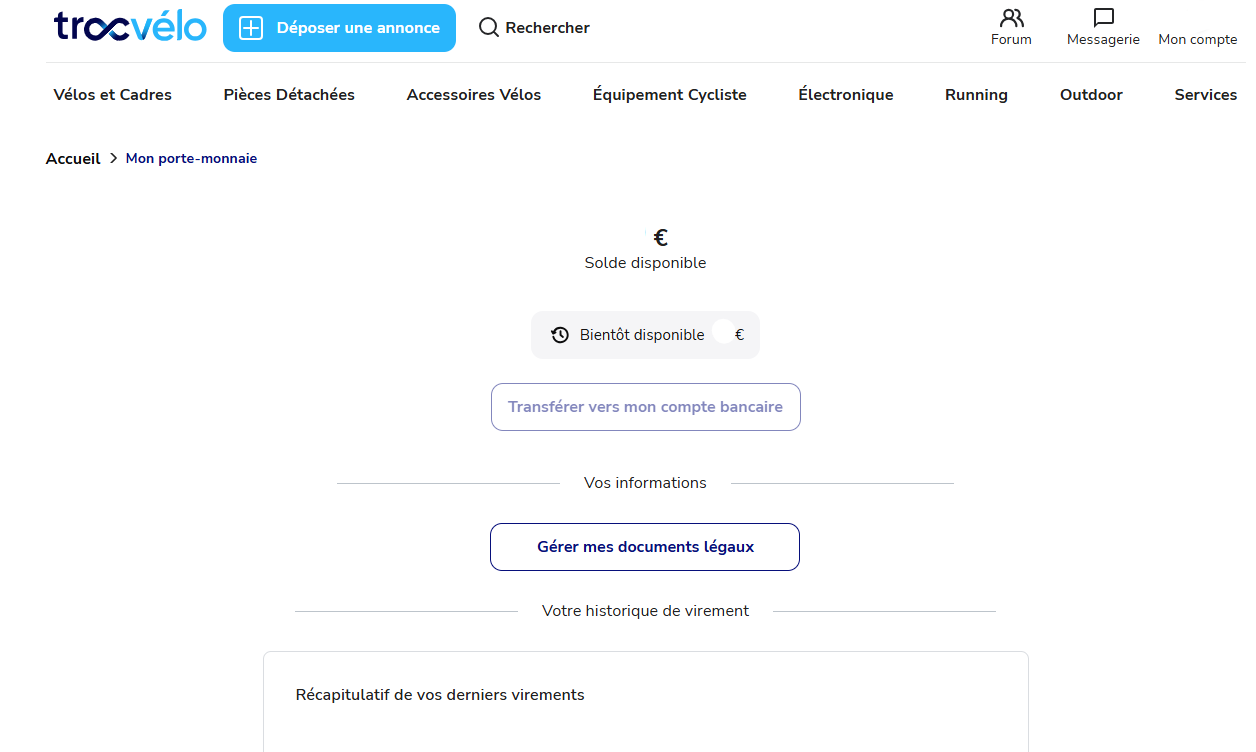
Étape 6 — Récupérer vos fonds
Retrouvez vos fonds dans votre porte-monnaie Troc Vélo (délais de déblocage de fonds moyenn entre : 3-4 jours ouvrés).
Recevoir via la livraison Cocolis
La livraison via Cocolis repose sur un transporteur professionnel ou particulier qui effectue déjà un trajet passant à proximité du vendeur et de l’acheteur. Il peut ainsi récupérer puis déposer le colis facilement au cours de son parcours : une solution souvent plus économique et écologique qu'un transporteur classique, avec une livraison directement à votre domicile.
💡 Bon à savoir : les frais de livraison affichés incluent une assurance Cocolis jusqu'à 5 000 € en cas de casse ou de vol pendant le transport — rien à sélectionner de votre côté.
Étape 1 — Faire une offre d'achat
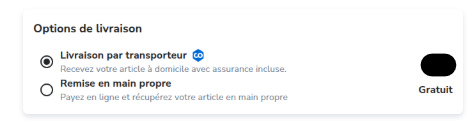
Sélectionnez la livraison Cocolis sur l'annonce, indiquez votre adresse. Une empreinte bancaire est prise mais vous n'êtes pas débité à ce stade.
Étape 2 — Un transporteur se positionne
Le vendeur a 72 heures pour répondre. S'il accepte, une annonce de transport est publiée sur Cocolis : un co-transporteur se positionne sur le trajet, puis Cocolis vous contacte — vous et le vendeur — par e-mail et SMS pour caler ensemble un créneau de livraison. S'il refuse ou ne répond pas, votre offre est annulée et vous n'êtes pas débité.
💡 Bon à savoir : le prix Cocolis dépend du volume, du poids et de la distance — il peut être jusqu'à 60 % moins cher qu'un transporteur classique. Comptez généralement de quelques jours à quelques semaines avant la livraison, selon les disponibilités du vendeur et des transporteurs.
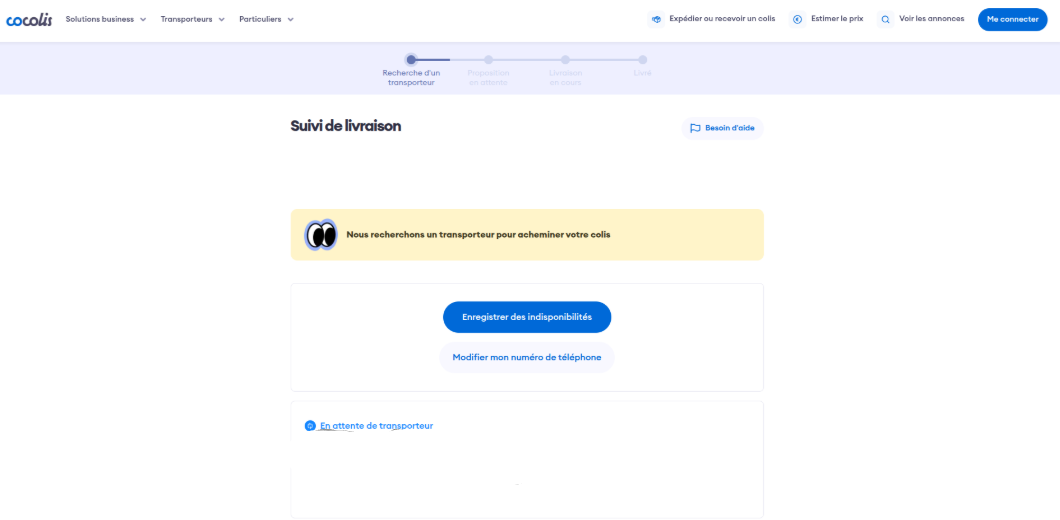
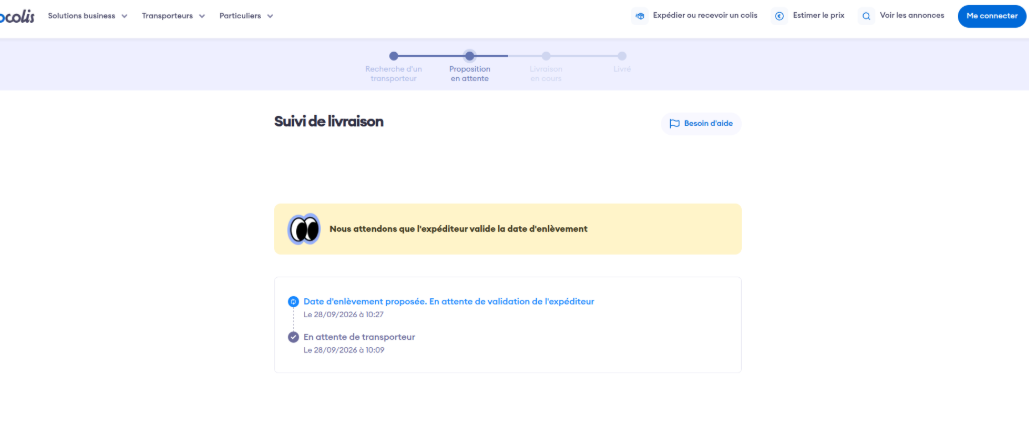
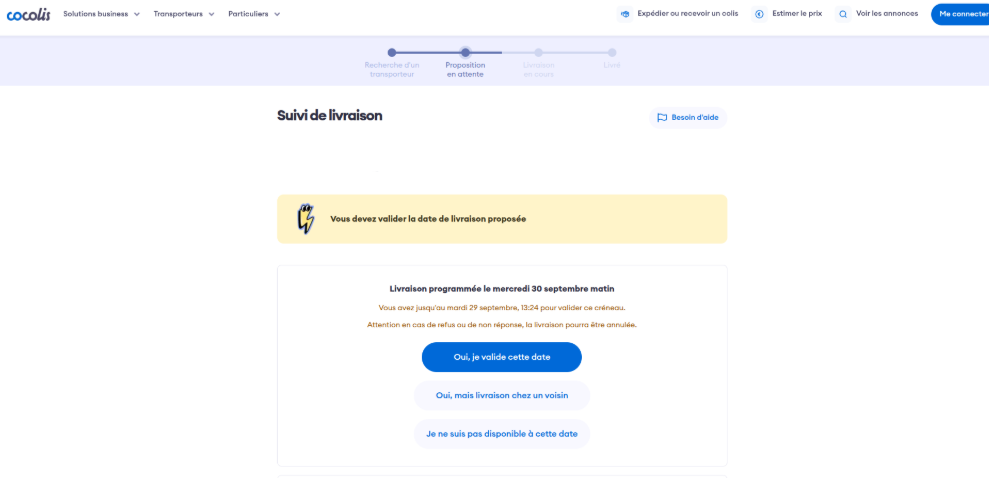
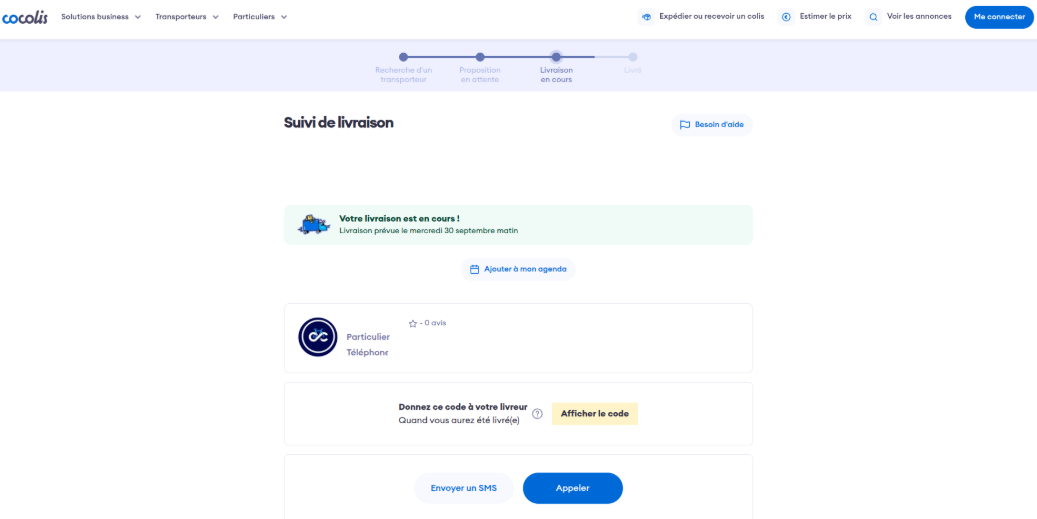
Étape 3 — Livraison
Suivez l’avancement via la messagerie Troc Vélo depuis le lien de suivi. Le jour de la livraison, vous devrez remettre un code au transporteur pour valider la réception.
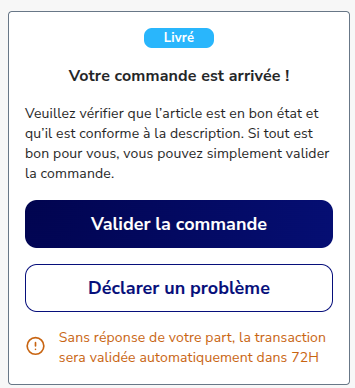
Étape 4 — Valider la conformité
Pensez à vérifier l'état du vélo, idéalement en présence du transporteur (une pièce d'identité peut vous être demandée), puis validez sur Troc Vélo. Vous disposez de 5 jours après réception pour signaler un problème éventuel en ouvrant un litige depuis votre messagerie Troc Vélo — passé ce délai, la réception est validée automatiquement et il n'est plus possible de revenir en arrière.
⚠️ Attention : en cas de casse ou de vol, il faut ouvrir un litige dans la messagerie Troc Vélo et faire la réclamation auprès de Cocolis, avec les photos prises avant l'envoi : contact@cocolis.fr, dans un délai de 5 jours (2 jours en cas de vol).
Didn't find the answer to your question? Contact the Troc Vélo team directly
Contact us