How do I transfer the money in my Troc Vélo wallet to my bank account?

How do I transfer the money in my Troc Vélo wallet to my bank account?
The money you receive from your sales on Troc Vélo is recorded in your Troc Vélo wallet. To make your first transfer, **you must have verified your identity and added your bank details (RIB) to your profile with our payment provider, Stripe. **
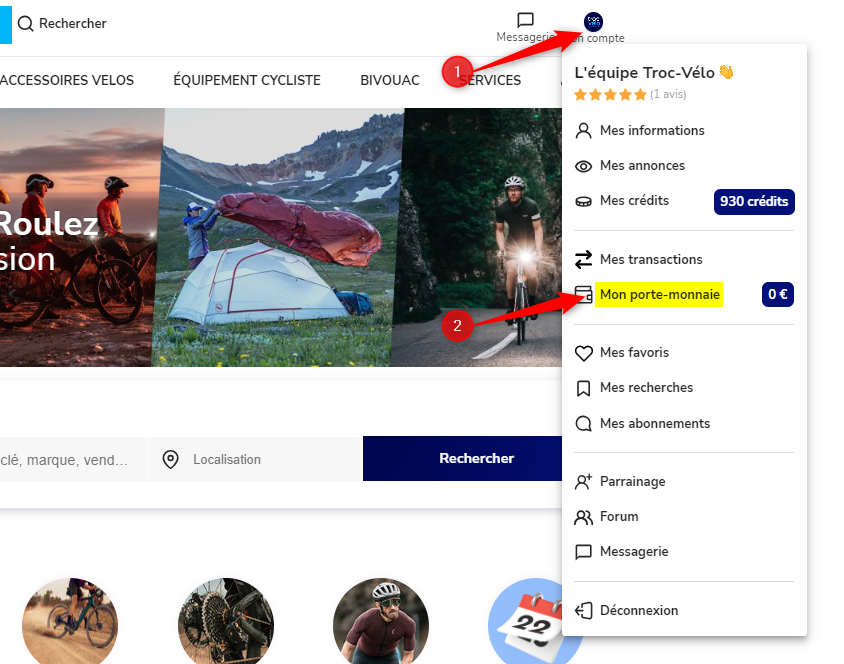
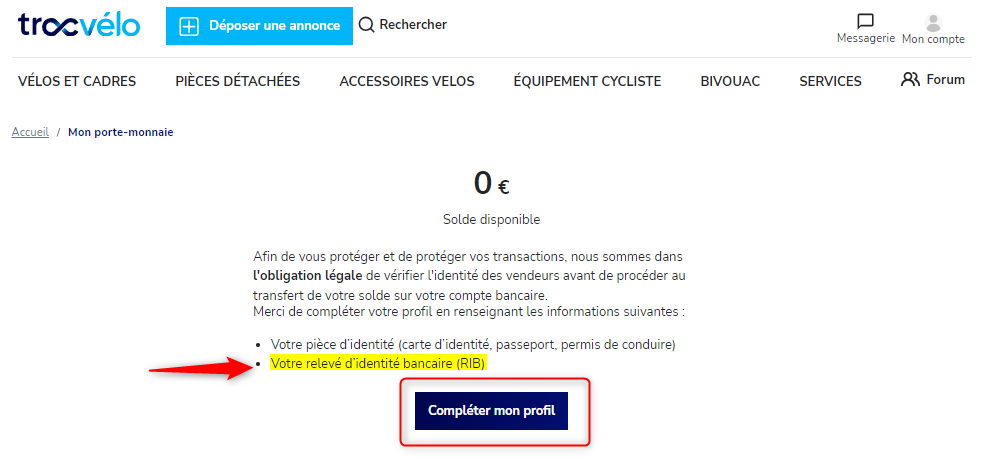
You can transfer your balance to your bank account at any time (free of charge), once your documents have been verified and your bank details entered on Stripe:
- Log in to your Troc Vélo account.
- From the "My wallet" page
- Click the “Transfer” button. A message tells you that you are about to transfer your balance to your bank account.
- Check that the bank details shown are correct and click “Confirm transfer”.
- Your transfer is then confirmed! Allow 5 to 10 working days for the money to be available in your bank account (depending on your bank's processing times).
These articles may also help you:
- How do I sell an item with in-person handover on Troc Vélo?
- What is delivery by the seller on Troc Vélo?
- What is secure payment on Troc Vélo?
- How do I offer secure payment when selling my listing on Troc Vélo?
- Why is there no “Buy” button on the listing I'm interested in?
- How do I enter delivery costs on my Troc Vélo listing?
- Why am I being asked to verify my identity and upload my ID?
- I can't verify my identity: why?
Find us on the Google Play Store and the Apple Store

|

|