How do I enter delivery costs on my Troc Vélo listing?

How do I enter delivery costs on my Troc Vélo listing?
If you want to send your item by your own means and state the associated delivery costs so that they are added to the basket when a customer buys your listing, your listing must first offer secure payment.
Once your listing offers secure payment with delivery by the seller, you can then specify:
- The amount of the delivery costs of the carrier you have chosen to send the parcel to the buyer. The delivery costs are then automatically added to the buyer's basket.
- The delivery zone is the area to which you are willing to send the parcel for the amount you entered just before.
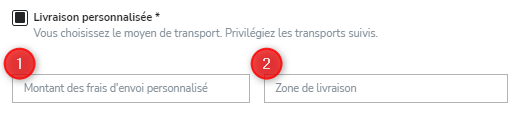
⚠️ Change the shipping costs and delivery zone by editing your listing. To edit your listing, go to your “My listings” page, then click the “** Edit **” button on the listing for which you want to change this information.
⚠️ It is not currently possible to enter several rates for several zones.
These articles may also help you:
- Find out how to sell your item.
- How do I sell an item with in-person handover on Troc Vélo?
- What is delivery by the seller on Troc Vélo?
- What is secure payment on Troc Vélo?
- How do I offer secure payment when selling my listing on Troc Vélo?
- How do I transfer the money in my Troc Vélo wallet to my bank account?
- Why is there no “Buy” button on the listing I'm interested in?
- Why am I being asked to verify my identity and upload my ID?
- I can't verify my identity: why?
Find us on the Google Play Store and the Apple Store

|

|