Selling a Product with In-Person Handover on Troc Vélo

Selling a product with in-person handover on Troc Vélo
Troc Vélo secure payment is available for in-person handover transactions. It lets you meet your buyer, be sure of their solvency thanks to our partner Stripe, and avoid unpleasant surprises such as bounced cheques or last-minute transfer cancellations.
💡 Good to know: As a private seller, secure payment is completely free. The protection fees are paid by the buyer.
Prerequisites
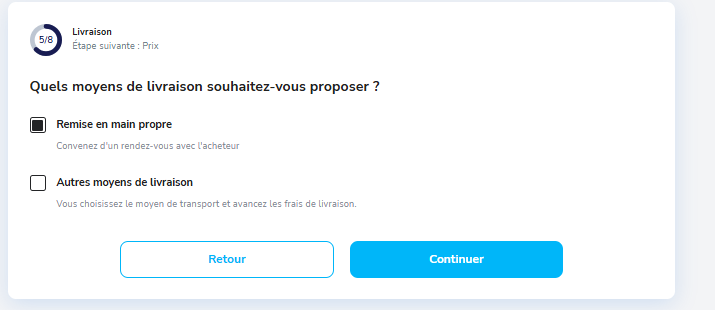
To offer secure payment with in-person handover, you must have enabled this option when posting your listing. Go to the “Listing estimate” step and choose “In-person handover”.
You can also enable this option on an already published listing from “My account” → “My listings” → “Edit”.
⚠️ Important: To receive your funds, your identity must be verified with our payment provider Stripe. This verification will be requested during your first transaction.
The steps of a sale with in-person handover
Step 1 — Receive and process an offer
When a buyer is interested in your product, they submit an offer via Troc Vélo messaging. You receive a notification and have 72 hours to accept or decline.
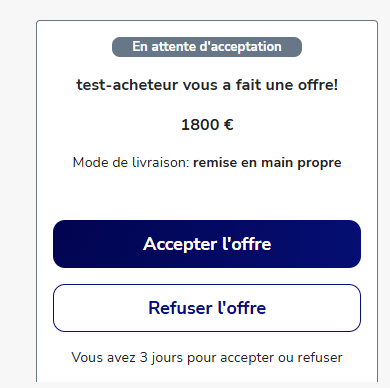
- ✅ If you accept: the amount is debited from the buyer's bank account and secured with Stripe. You can then arrange a meeting.
- ❌ If you decline (or do not reply within 72 hours): the card hold is automatically released and the buyer is not charged.
💡 If you want to lower the price following a negotiation, edit your listing directly via “My account” → “My listings” → “Edit” → “Listing estimate”.
Step 2 — Arrange a meeting
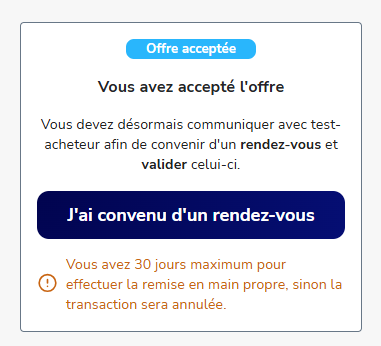
Once the offer is accepted, use Troc Vélo messaging to organise the meeting with the buyer. You have 30 days to carry out the exchange.
⚠️ Warning: After this 30-day period, the transaction is automatically cancelled and the funds are returned to the buyer.
💡 Safety tips for the meeting:
- Choose a public, busy place (shopping centre car park, metro station...)
- Never ask for additional payment outside the platform
- Do not share your bank details
Step 3 — Carry out the exchange
At the meeting, hand the product to the buyer and give them time to inspect and test it.
Step 4 — Share the validation code
If the buyer is satisfied with the product, give them the 4-digit validation code available in your Troc Vélo messaging. The buyer must enter this code in the conversation to finalise the transaction.
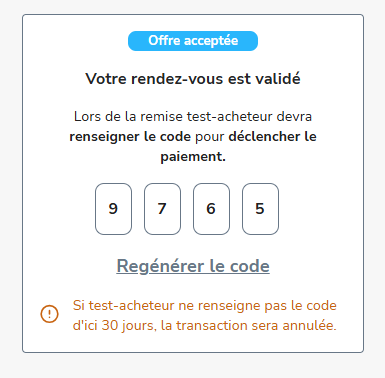
⚠️ Only share your code after handing over the product and only if the buyer is satisfied. Once the code is entered, the transfer is final and there is no going back.
Step 5 — Collect your funds
Once the code has been validated by the buyer, the funds are instantly paid into your Troc Vélo wallet.
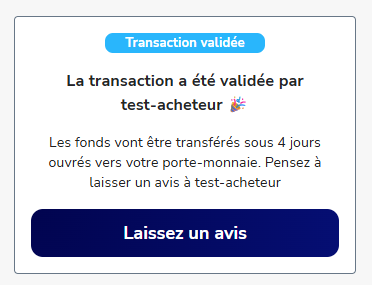
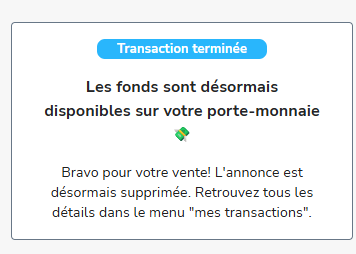
To transfer them to your bank account, go to “My account” → “My wallet”.
⚠️ For regulatory reasons, the funds are held for 3 to 4 working days before they can be transferred. Make sure your identity is properly verified with Stripe so as not to delay the transfer.
These articles may also help you:
- Find out how to sell your product:
- How do I cancel an in-person handover transaction on Troc Vélo?
- What is secure payment on Troc Vélo?
- How do I offer secure payment for the sale of my listing on Troc Vélo?
- How do I transfer the money in my Troc Vélo wallet to my bank account?
- I can't verify my identity: why?
- What is delivery by the seller on Troc Vélo?
Find us on the Google Play Store and the Apple Store

|

|